Simplifying a Scientific Platform to Improve Adoption
Reorganizing a fragmented legacy platform around one familiar input–compute–output workflow.
Overview
Corning had a powerful materials informatics platform, but its legacy interface made that capability difficult to learn, adopt, and scale. It worked for experienced experts; for everyone else it was awkward and confusing, with work fragmented across complicated stages.
I led the experience strategy that reorganized it around one conceptual task: input → compute → output. This was workflow and product-architecture simplification, not visual cleanup—aimed at making the platform learnable and positioning it to scale.
A note on the visuals: the workflow diagrams are generalized portfolio reconstructions; the input and output screens are actual design artifacts.
My Role
I led
- Customer and workflow discovery
- Product definition of the simplified experience
- The input–compute–output workflow model
- The redesigned input and output interfaces
- Interaction and experience direction
- Corning’s first enterprise design system
I influenced
- Product priorities for usability and adoption
- How the platform’s capabilities were exposed to users
- The case for simplification over added features
I partnered on
- Technical feasibility, with engineering
- Scientific accuracy of the workflow, with materials scientists
- Product direction, with business and product stakeholders
- Implementation and delivery, with engineering teams
Outside my authority
- The underlying scientific computation and models
- Scientific research programs
- Corning’s enterprise strategy
- Final investment authority
- Independently measured business outcomes
The Problem
A Fragmented, Complicated Workflow
The platform’s scientific capability was real and valuable. The difficulty was getting to it. The legacy product was organized around the system’s separate functions rather than the user’s task, so completing work meant moving through multiple disconnected stages and interfaces and stitching them together by hand. Mapping the existing paths through the product made the fragmentation concrete: a set of parallel routes, each with its own inputs and outputs, and much of the real work spilling out into external spreadsheets at both ends.
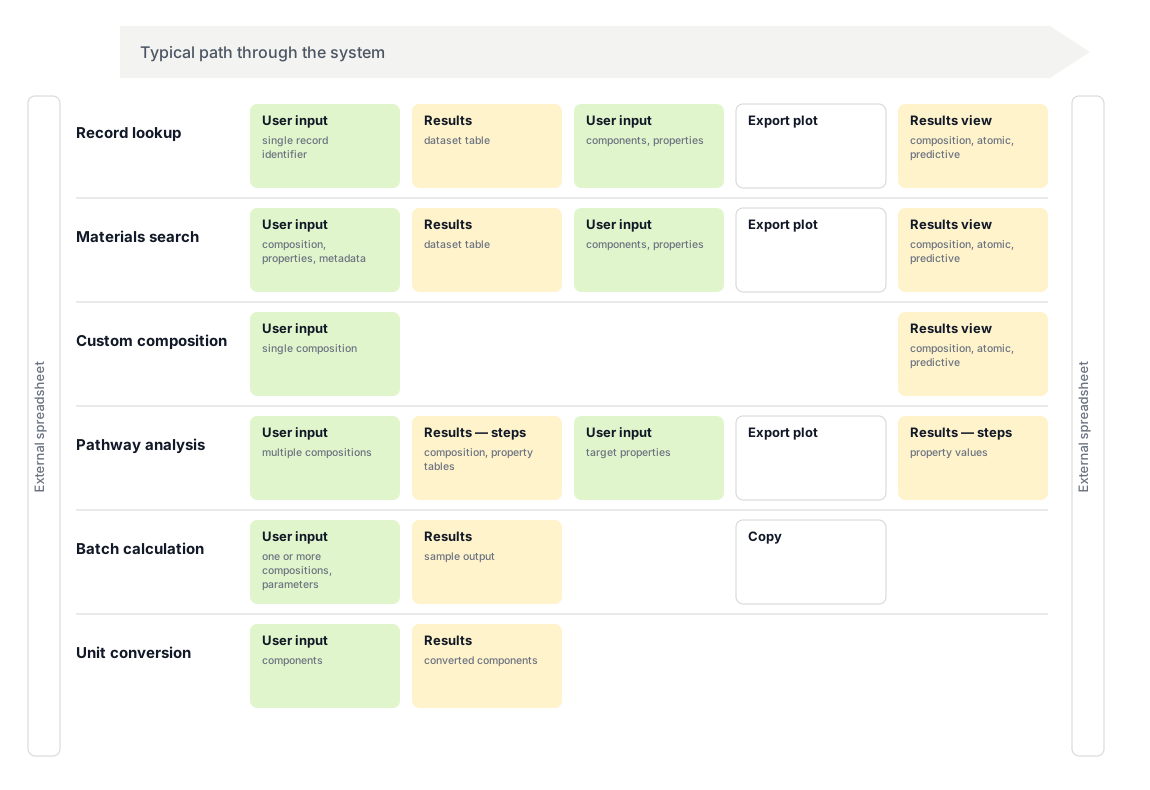
Workflow audit of the legacy product, generalized. Each row is a separate path through a different part of the system; the bars on both sides are external spreadsheets. Completing work meant navigating several disconnected stages rather than one coherent flow.
The Legacy Interface
System Complexity, Exposed to the User
The fragmentation showed up on every screen. The interface exposed the system’s internal complexity directly to the user: dense layouts, confusing interaction patterns, and a high operational overhead that made the product difficult to learn for anyone who wasn’t already an expert in it. It was powerful in expert hands and awkward for everyone else — and for a product that needed to reach a broader base of users, that was a scaling problem as much as a usability one.
Legacy interface (generalized)
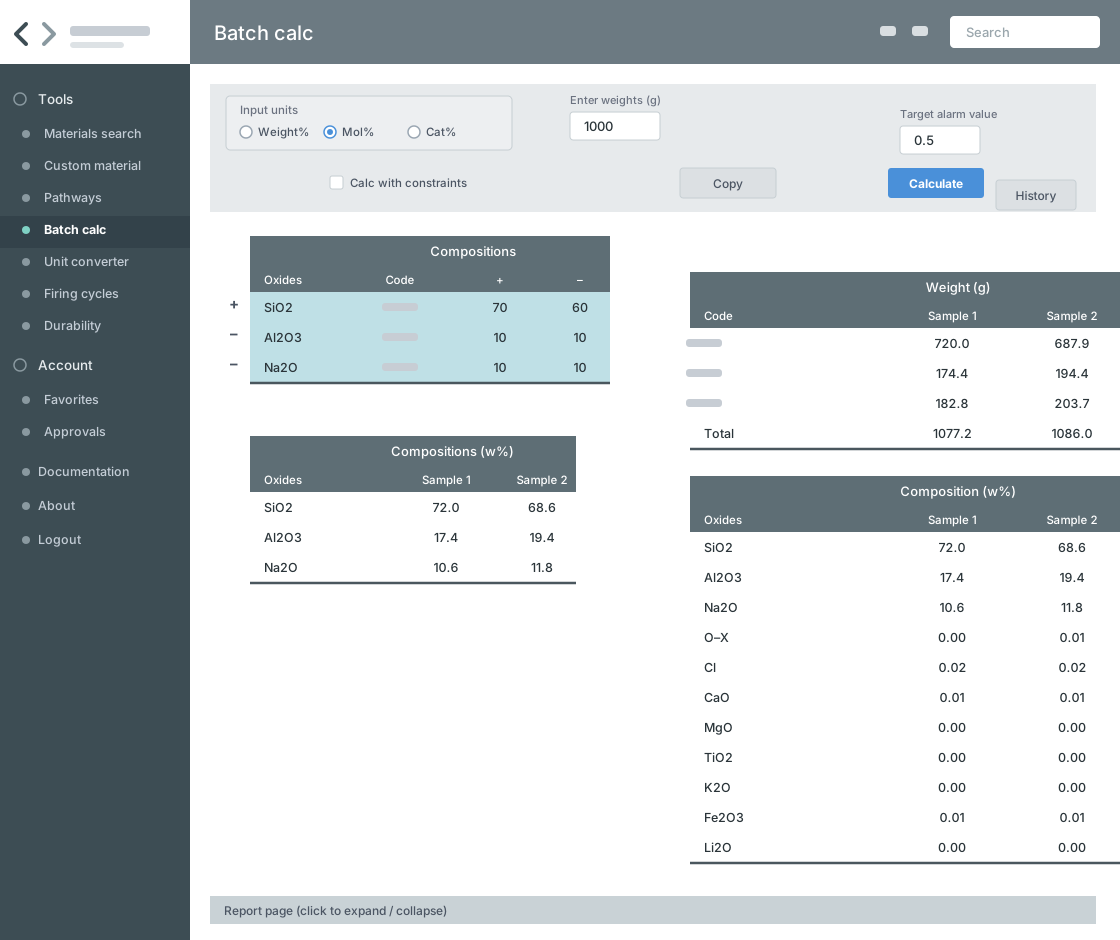
Dense, option-heavy screens exposed the system’s internal structure to the user — powerful for an expert, but confusing to learn and awkward to operate. Recreated for portfolio.
The Reframe
One Simple Flow, Organized Around the Task
The platform was technically capable. The problem was reaching it. The interface and workflow architecture were making a powerful system unnecessarily difficult to use.
A complicated, fragmented experience organized around system complexity became a single, familiar flow: input → compute → output.
Everything the platform could do still fit inside three stages: enter a composition, run the computation, read the result. The power was unchanged; the path to it became something a new user could follow.

The simplified workflow. A single input–compute–output flow replaced the fragmented set of stages, giving users one familiar path through the product.
Input
A Familiar Entry Point, Informed by Spreadsheets
During discovery, I noticed that one scientist’s spreadsheet followed the convention used to document new material compositions in patent filings. I treated that pattern as a hypothesis and tested it before socializing it broadly, letting evidence shape the discussion before stakeholder preferences hardened. The tested structure became the basis for the input model—candidate compositions side by side in columns, making entry and comparison part of the same view.
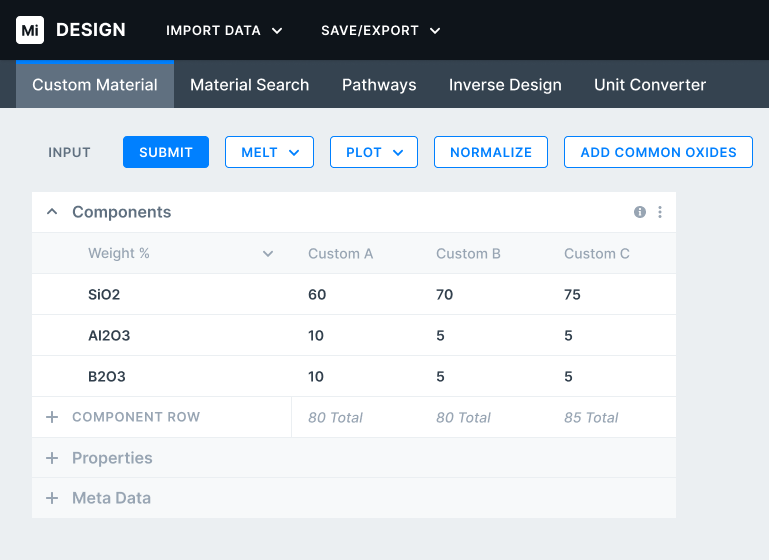
Created input design. Candidate compositions are entered side by side in a table, translating a domain-native documentation convention into a clearer product interface.
Compute
The middle stage was the platform’s existing strength. The computation was already powerful; it did not need to be reinvented. What changed was access to it: instead of sitting behind dense, fragmented screens, the same capability became a clear step inside a single flow — entered from a familiar input and leading directly to a readable result.
Output
Results That Were Easier to Read and Use
The output stage turned the platform’s computation into something users could interpret and work with. The design centered the experience on an interactive ternary plot, with component context, filters, and visual controls integrated into the same view. This connected the result directly to the input and computation stages rather than leaving it as a disconnected table or exported artifact.

Created output design. Computed results are presented through an interactive ternary plot with linked component context and controls, making the output easier to interpret and use.
Enabling Scalable Delivery
As the work expanded across distributed teams, inconsistency became a throughput constraint. I established Corning’s first enterprise design system—shared standards and governance that moved recurring decisions into a reusable layer. Engineering leads estimated it reduced implementation effort by approximately 20%.
Evidence & Outcomes
Created
Designed as product solutions
- Simplified the experience into a single input–compute–output workflow
- Created the redesigned input experience, informed by the tested domain convention
- Created the redesigned output experience, connected to the unified workflow
Delivered
Organizational infrastructure — implemented and adopted
- Established Corning’s first enterprise design system
- Engineering leads who adopted it estimated it reduced implementation effort by approximately 20%
Observed & Validated
Supported through research and evaluation — not independently measured
- Users found the legacy interface confusing and difficult to learn, and adoption was weaker than the platform’s capability warranted
- The work was fragmented across disconnected stages rather than a single coherent flow
- Users already organized composition data in spreadsheets — a familiar structure that informed the input model
- The simplified workflow was clearer and more usable in evaluation
Intended
Directional; not independently measured
- Broader adoption across a wider base of users
- Easier onboarding and reduced learning effort
- Improved scalability as the product and user base grew
- Less confusion and overhead at scale